ECOFLOW Delta 2

I recently bought an ECOFLOW Delta 2. I usually prefer to build my own battery pack, but this one was on sale on Amazon, and I was curious about how it would perform for some high-wattage AC applications.

The device is pretty easy to set up. You take it out of the box and plug it into an AC socket to charge. I had a dedicated circuit for my old refrigerator that wasn’t in use anymore. I figured this would allow it to draw a lot of power without tripping a circuit breaker.

It’s pretty light. I can carry it around in one hand while opening doors with the other. This may not be the case for everyone, but I don’t regard myself as having a lot of upper body strength.

The ECOFLOW Delta 2 feature set meets my needs. With an 1800-watt inverter inside, I can plug in a water kettle, a coffee maker, a microwave, or an induction plate. Granted, I can’t plug in more than one of these at a time. I really don’t need to, though. To boil water in a Kettle takes about 5% of the battery life. Similarly, I can cook eggs on the 600 W setting in short order with my induction plate. Since the battery life is measured in Watts-hours, using a lot of watts for a short time leaves power in reserve for other applications.

I also have a K-cup coffee maker that uses 860 watts. The 5% of battery life is a good trade-off when the power is out.

Most of these experiments were done on the bus. I went to a tournament and made coffee in the parking lot, or I was in a park and made a Mountain House meal that required 10 oz of boiling water. Being able to do these things in places without electricity hookups is excellent.

The batteries can be charged via an electrical cord plugged into an AC or a DC line that runs from solar panels or a car cigarette lighter plug. In the recent power outage on the island, my wife drove around with the ECOFLOW in her car and restored 15% of the power to the battery. In a long-lasting power outage, this would

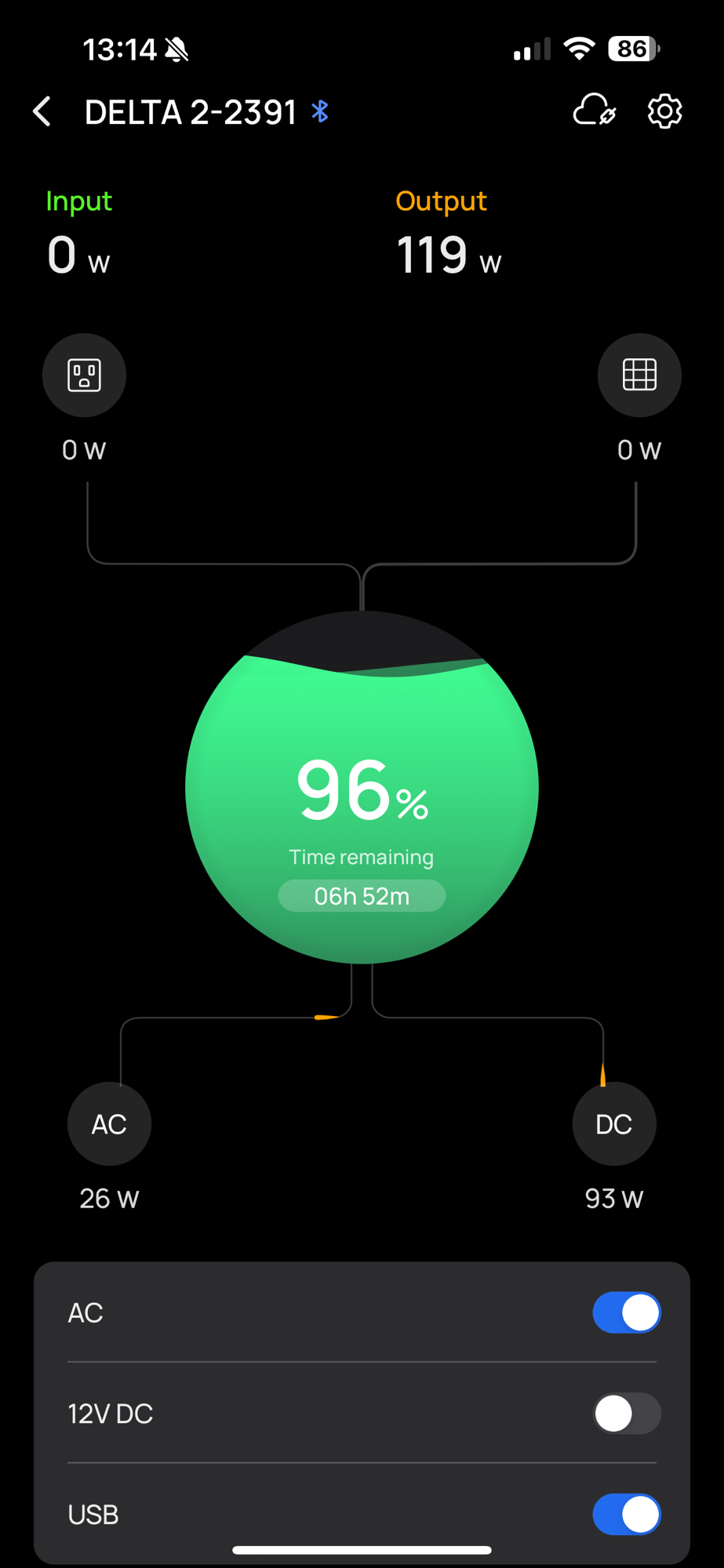
I use an iPhone app to monitor input and output in real time. This is great when you use your device (laptop, phone, tablet) in the living room, and the ECOFLOW powers your internet router in the office.

You can see how much power you’re drawing from the AC wall plug and the power supplied to your DC input port (solar or car alternator). At the same time, you can see the power you’re supplying to AC devices (through the inverter) and DC devices, either 12V DC or USB power ports.

Of course, as soon as the power outage ends, I make sure that the ECOFLOW is plugged in. You never know if the power will go out again. It’s good to have you’re battery charged, just in case.

Battery Boxes

I built a battery box out of a case from Harbor Freight. I had seen a similar box sold by Powerwerx for $259.99. Given the availability of these boxes at a much lower price ($34.99) and the cost of the parts involved ($140.78, with a bigger battery), I thought I’d be better off building a box at a reduced cost (~$176). I would also have the advantage of adding more PowerPole connectors instead of a cigarette lighter socket. If I ever need to plug into such a socket, I have a PowerPole to cigarette lighter socket adaptor that I made from spare parts.

While I did not compute labor costs in the box construction, I included all the parts (except the wiring, which I had lying around the shack). I find building little things like this relaxing. So, the labor costs aren’t really an issue for me. I didn’t even time how long it took me. If you find this laborious, You may want to just buy a box from Powerwerx.

Box Construction

To build this box, I had to drill 3 holes in the side that were big enough for the panel mounts. The three panel mounts I decided to include were a combination USB A/USB C/Voltmeter, and two mounts that house two PowerPole connections each for a total of 4 PowerPole connections.

I figured I could run a radio, an antenna tuner, and a light, which would use up three PowerPole plugs. I could use the fourth plug to simultaneously charge the battery if I’m somewhere with access to electricity or if I want to use a portable solar panel.

To drill these holes, I found that a stepped drill bit helped me select the right-sized hole for the size of the panel mounts. While not all panel mounts require the same size hole, they’re similar. This bit will help you step your way toward the right size so that the threads fit through but not the collar of the panel mount.

Once the holes are drilled, take the nut off the panel mount, slide the mount through the hole, and tighten the nut back on the panel mount until the collar of the panel mount is secure against the side of the box.

Wiring

Wiring is fairly simple. The USB charger comes with its own wire that has a ring on one end for the battery terminal and clips that fit into the back of the panel mount. It’s important to make sure that you get the polarity correct. A ‘+’ for positive (the red wire) and a ‘-‘ for negative (the black wire) is etched in the plastic. If you have trouble seeing them, a flashlight from a cellphone helps a lot.

When it comes to the PowerPoles, you have to be a little more attentive.

Make sure you use the right gauge of wire for the power you want to pull. I probably overdid it with 10 AWG wires, which kept me from putting multiple wires in a ring connector. With four think ring connectors, I barely got the battery screws to hold them down. However, I wanted to be able to pull enough amps to run my 100W radio and didn’t want to worry about which PowerPoles could handle which current. Having the 10 AWG wires on all of them makes that possible.

It is a best practice to use red for positive and black for negative. Doing so will make it less likely that you will attach the wires to the battery incorrectly.

Make sure that the wires are long enough to reach from the battery terminals to the PowerPoles. Put the rings on one wire end and PowerPole inserts on the other. Place the inserts into the PowerPole housings. Then, attach the rings to the terminals of the battery. Red to the positive screw and black to the negative screw.

Preventing Rattling

Once this is done, you’ll want to secure the battery. This step will keep the battery from rattling around when carrying the box by its handle. Fortunately, the box came with a bunch of foam rubber that can easily be separated to match the shape of whatever is being stored in the box. Carefully tear the rubber (along the perforations) to match the large area between the battery and the panel mounts. Then, use the scraps to fill in the area between the battery and the front of the case.

Testing the Battery

At this point, you’re ready to test the battery.

A button on the USB panel turns on the connectors and the voltmeter. Press the button and verify that the battery is charged. The full charge will be somewhere around 13.8V. If the voltmeter doesn’t show anything, the wiring polarity is likely incorrect. The battery probably needs to be charged (see below) if the voltage is too low.

Plug a USB cable into each port and verify that it charges your phone. This is probably what you’ll use it for. In my case, I use it to power a Raspberry Pi. If you want to do this, you’ll need a USB C port labeled PD.

Once the USB system works correctly, check the polarity of the PowerPole ports with a voltmeter. If the voltage is negative with the red lead connected to the red side and the black lead connected to the black side, you’ve wired it backward. If they are all positive, plug a device into each port and verify it has power. If so, you’re good to go.

Charging the Battery

To charge the battery, simply hook a charger to one of the PowerPole ports. I use NOCO chargers. I take the adaptor that comes with the charger and convert it PowerPoles to make this easier. For a battery this size, I use the 1 amp model. Be sure to set the charger’s battery type to the type of battery you put in the box. I use LiFePO4 batteries, so I set the charger to 12V Lithium.

Parts List

Here are the parts other than wires and connectors that I purchased to build this box.

Making an Emergency Power Lamp

A lot of people have lanterns, Flashlights, and candles for lighting when a power outage occurs. I’ve started building my lamps into my radio power supply so that they’re independent of power mains. In essence, my shack works the same way whether the power is out or not. In this article, I’ll go through my solution and touch on the drawbacks that I was trying to avoid.

The first drawback was battery power lost in converting DC to AC. I could just run a normal lamp plugged into an inverter that is attached to my LiFePO battery bank. This wastes power that is lost in the conversion from DC coming out of the batteries to AC going into the lamp. In order to avoid this loss, I want to keep the entire system on DC power.

The second drawback is the form factor. I want normal lighting without figuring out where to place the lantern or how to hold the flashlight correctly. Lamps are nice because they’re positioned for optimal lighting and can stay there.

To address both of these concerns, I found some 12 volt DC-powered light bulbs. I can put them in the lamp and run the lamp on my battery. I could accomplish this with a simple lamp plug to power poles converter, which would run totally on DC, but would also let me use the lamp with AC power and an AC bulb. However, this raises more concerns.

The third concern is that an AC bulb should not be plugged into DC and a DC bulb should never be plugged into AC. While it is unlikely that I would make this mistake, someone else in my household that doesn’t understand how this system works might make this mistake.

To add a bit of Poka-yoke (mistake proofing) to my solution, I cut off the plug. This ensures that the lamp will never be plugged into AC again. I put power poles on the wire coming out of the lamp. It is important to get the polarity right when wiring this up. When the light manufacturers make the light, they don’t have a standard for which wire goes to the lightbulb case and which goes to the lightbulb tip. You can find this out by using a multimeter to test the continuity between each of the wires and the center connector in the socket. Whichever wire goes to the center connector, that’s your red power pole, the other is your black power pole. If neither of them connects to it, you most likely have the lamp switch in the off position.

The fourth concern is that lamps are not as simple as they used to be. When selecting a lamp be sure to pick one that is just a lamp. If you select one with a USB charger or AC outlet built-in, your conversion from AC to DC would also be sending DC to these circuits, which could have undesirable outcomes ranging from higher current draw to fire. Be sure to select a simple lamp that doesn’t have other features that rely on the AC input. I chose a desk lamp so that I’d always have lighting for my radio desk.

All that’s left to do is to plug it into a battery supply. Obviously, that supply has to have power poles coming out of it in order to plug into it. I have my batteries going into a power pole distribution box, into which I plug in my lamps. I’ll have another blog entry detailing the battery box that I’ve constructed to make the light portable enough to be moved around the house.