The Most Human Machine I Ever Owned

From The Daily Post, today’s topic was “Soulful Machines,” asking “What’s the most ‘human’ machine you own?

In 2008, I left my job at Amazon.com to become the Director of Quality Assurance at a small startup called Ugobe. Ugobe made artificial life forms, a phrase that, up until then, I’d only hear in science fiction. It was a wonderful experience, interacting with some of the most forward-thinking people whom I’ve ever met. There was a lot that our products didn’t do with respect to being completely autonomous and alive. However, we only believed that they couldn’t do it yet.

Our first product was a robotic dinosaur named PLE0. Unlike other dinosaur robots, PLE0 had no remote. It decided what to do, when and how. If something happened to PLE0 (good or bad), PLE0 would react to it to show his approval or disapproval.

One of the fascinating aspects of the product was the way that it affected other life forms, mainly humans. As humans, we have an incredible capacity to fill in the gaps in our experience, if we observe 70% of an alive experience, we tend to fill in the gaps by overlaying our living experience onto the portion of the living experience that is present. This allows us to bond with the artificial life form as if it is alive. We see evidence of sadness, and consider the events that took the robot to being sad; and, soon, we’re thinking about the robot’s feelings to the point where some humans are visibly upset when PLE0 wails with discomfort.

As I was learning all of this, I decided to introduce PLEO to my 4-year-old. I found an excellent opportunity to do this while she was coloring one day. I thought that it would be interesting to see which activity would be more compelling. It turned out that I learned a lot more.

You can see that Sunny refers to PLE0 as “she,” which was remarkable since at the lab we all referred to PLE0 in the masculine sense. Also, she was immediately asking if PLE0 could color with her. Lastly, as soon as she touched PLE0 and experienced PLE0’s reaction, the coloring activity was out of her mind.

The video is only 1:43 because my camera phone didn’t have the capacity of today’s phones. This leaves a gap between the first video and this one. Sunny had been so rough with PLE0, that I began to pet PLE0 to try to bring down his anxiety so that Sunny could get a more balanced experience. Sunny let me know that she thought I was petting PLE0 too hard.

It’s fun to look back at this video, now six years later. PLE0 was an acronym for Personal Life Enhancing Organism. Although he mainly sits on the shelf in my office today, he’s the most human machine that I own.
Removing the KVM from my Linux box

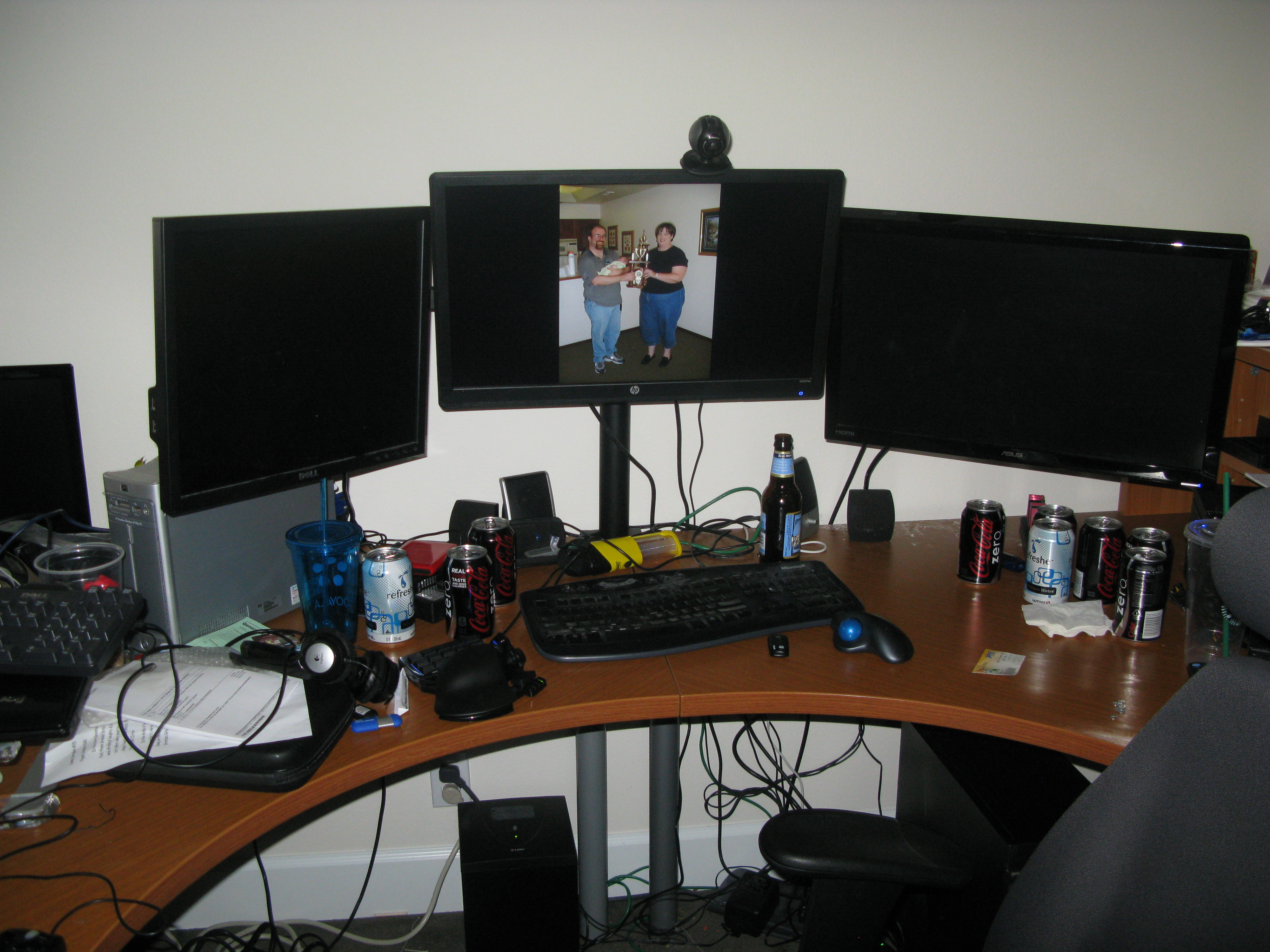
I bought a 3 monitor swivel arm this past week. From my PC, I have 1 monitor running from the HDMI output, and one running from the DVI. From my old HP Pavilion Slimline, I have a VGA cable running into the third monitor.

I wanted to run a KVM switch so that I could use one keyboard and mouse with the the PC and Linux box. However, because I’m using a different output format for each of the three monitors, the KVM switch won’t switch the monitor. Plus, even if the keyboard and mouse are switched back and forth, the mechanism of the switch is different from the PC’s fluid motion of dragging the mouse over from one screen to the other.

So, I installed an implementation of VNC on each box, using VNC to share the keyboard and mouse.

On the PC side, I used Win2VNC as the client that would connect to the server. The video that I saw online (https://www.youtube.com/watch?v=pJ0FE4hsfUQ) showed this software being used to connect to TightVNC, which was a little much for just using the Keyboard and mouse. But, Win2VNC was a usable client that would allow for dragging the mouse to the target computer.

On the Linux side, I installed X11VNC, which, like TightVNC, was also used for presenting a remote desktop to another computer, but can be configured to present the active x11 screen and not to present the framebuffer across the network (via the -nofb flag).

My next step is to make this server start on bootup, so that I don’t have to log in with a separate keyboard and mouse. Once I do that, it should mostly function as one if it were one computer.

My 3 monitor swivel arm stand. Now I just need to clean up the desk. :-)
My 3 monitor swivel arm stand. Now I just need to clean up the desk. 🙂


Chromebook

I’ve recently purchased a Chromebook. It hasn’t arrived yet, but I got a head start on it by installing Chromium Vanilla on a USB stick and booting it up on an old desktop at home.

Things went pretty well, with the exception that ChromeOS couldn’t recognize the and use the network card in my old HP Pavilion Slimline. Once I moved the computer to another location and connected an Ethernet cable, the system was ready to go.
There are a lot of new apps that can run on ChromeOS since the last time that I looked at it. Increasingly, there are applications that can be run when the computer is not online (which makes a Chromebook infinitely more useful). Right now, I’m testing JustWriteBlog, which allows you to type your blog while offline for posting when you connect to the internet later. This would not hurt when using spotty internet connections, like the Washington State Ferries (implemented by Boingo) which drops out somewhere towards the middle of the Puget Sound.
If you’re seeing this post, it worked.